
A spike in requests carrying the Bytespider user agent is a reason to inspect your logs, not to block every crawler. Start with a narrow rule, confirm where it runs, and check that normal visitors and search crawlers still reach the pages they need.
This guide covers a crawler-specific robots.txt policy, a Cloudflare custom rule, and Apache or NGINX controls. A user-agent match identifies a declared name; it does not prove who sent the request. Choose the earliest enforcement point you control, then verify the result at both that layer and your origin.
Identify the traffic and choose your control point
Record the affected hostname, request time and timezone, method, path, status, user agent, response bytes and available request identifier. Separate CDN security events from origin access logs: they describe different stages of the same request. Check whether the load involves dynamic pages, static downloads or both.
Use a dated baseline from your own site. Counts alone do not establish a capacity problem; compare them with bandwidth, PHP worker use, CPU pressure and response times. Preserve equal observation windows and note caching changes, promotions or other traffic shifts before attributing a difference to a new rule.
| Control | Where it acts | What to verify |
|---|---|---|
| robots.txt | A cooperating crawler reads a policy | It does not reject requests |
| CDN / edge WAF | Before the origin, for traffic passing through it | Proxy coverage, rule order and edge events |
| Apache / NGINX | At the origin web server | Every relevant virtual host and served path |
| Application plugin | At the point its firewall is loaded | Whether static files and other apps bypass it |
An ordinary IP/port firewall cannot inspect an HTTPS user-agent header without HTTP-aware processing after TLS termination. A hosting panel may expose a WAF, but the word “firewall” alone does not establish that capability. Ask which layer evaluates the rule and where its decisions are logged.
Publish a narrow robots.txt policy
Back up the current file and add this group without changing the policies for other crawlers:
User-agent: Bytespider
Disallow: /
This asks a crawler using that product token not to crawl any path. It is a preference, not an HTTP access-control rule. As Google’s robots.txt guidance explains, compliance is voluntary and a blocked URL may still appear in search results. The file is not a way to secure private content.
Inspect the publicly served /robots.txt on each relevant hostname. A WordPress plugin or CDN may generate or modify it, so the editor view is not enough. Preserve sitemap declarations and existing groups. In particular, do not accidentally pair User-agent: * with Disallow: /. If requests continue, use an enforceable rule rather than assuming the policy failed to save.
Stop matching requests at the CDN edge
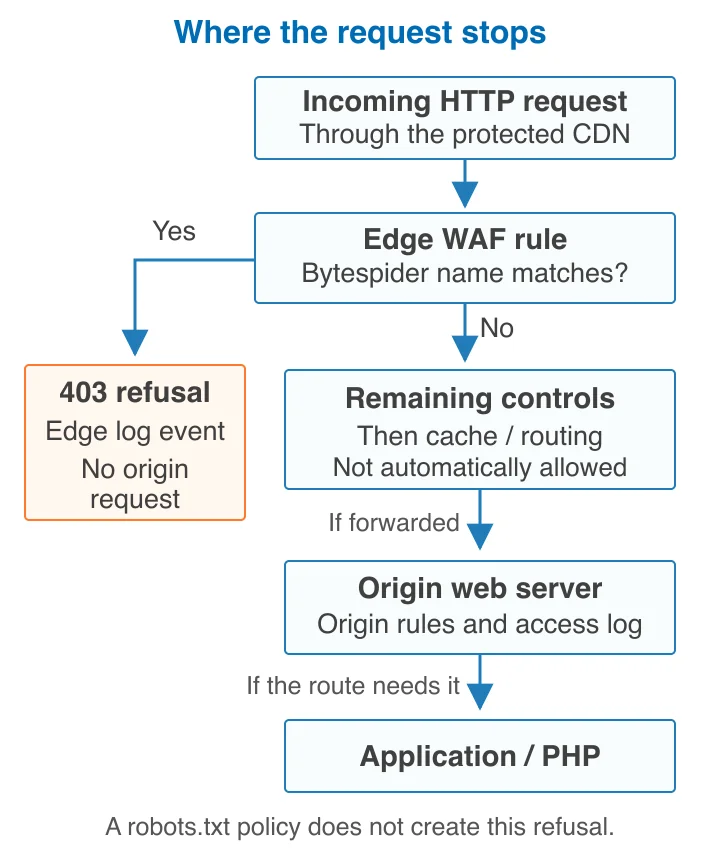
The diagram shows the path when a narrow edge rule is enforced: a matching request ends at the WAF; a nonmatching request continues through the remaining controls and may be served from cache or sent to the origin. It is not automatically trusted. Sources: Cloudflare custom rules and AI Crawl Control rule ordering, checked 17 November 2026.
Cloudflare recommends custom rules for user-agent blocking. For a case-insensitive substring match, use this expression with the Block action:
lower(http.user_agent) contains "bytespider"
The lower function handles ASCII capitalization variations. This rule deliberately matches the declared Bytespider token, not every ByteDance product or every bot. Scope it to the intended hostnames and all required paths. Use your own provider’s rule language if you use another WAF.
Before activation, review matches in the available analytics or logging controls. Availability depends on your plan; a challenge is an active intervention, not passive observation. Use rate limiting only if you want to permit a defined request rate, and select thresholds from the site’s observed workload rather than a universal number.
Check whether earlier Skip rules bypass this rule. If you use Cloudflare’s AI Crawl Control instead, inspect the actual crawler selection and generated WAF rule; do not enable a broader AI-crawler policy unintentionally. The two methods have different matching mechanisms.
Only traffic that passes through the protected edge receives that protection. Review alternate hostnames and direct-origin exposure. Origin access restrictions need a deliberate design that preserves monitoring, administrative access and required integrations; do not copy a broad IP block as a shortcut.
Enforce the rule in Apache or NGINX
Origin rules still consume connection and web-server resources, even when they stop a request before the application. Use them when edge controls are unavailable or a documented origin policy requires them. On managed hosting, ask support to implement the rule in the provider’s configuration rather than editing generated files.
Apache: put the refusal before application rewrites
For an Apache document root where mod_rewrite and the required FileInfo overrides are allowed, place this before the WordPress front-controller rules and outside the automatically managed WordPress block:
RewriteEngine On
RewriteCond %{HTTP_USER_AGENT} Bytespider [NC]
RewriteRule ^ - [F,L]
RewriteCond checks the request header; NC makes this match case-insensitive, and the F flag returns 403. Back up the existing file first. A custom error page can still invoke the application, so inspect the actual server behavior rather than promising zero PHP work.
The rule covers requests handled in that directory context. Separate virtual hosts, aliases, a front-end NGINX server or directly served CDN assets may follow another route. An Apache configuration check does not necessarily parse every per-request .htaccess file; test the affected URLs and watch the error log. See the related .htaccess configuration guide before combining unrelated rules.
NGINX: define the match once, use it in each site
Add this map in the existing http context, or in a file included from that context. Do not put it inside a server or location block:
map $http_user_agent $block_bytespider {
    default     0;
    ~*bytespider 1;
}
Then add the following inside each intended existing server block, before any other server-level rewrite or return that would end processing. Do not replace the site’s TLS or routing configuration:
if ($block_bytespider) {
    return 403;
}
The map documentation defines the context and case-insensitive ~* match. NGINX’s return directive stops processing with the chosen status. This example uses an immediate return, not complex rewriting inside an if block.
On a systemd installation with the standard nginx service, validate the configuration and reload only after success:
sudo nginx -t && sudo systemctl reload nginx
Use the provider’s reload procedure where the service name or configuration management differs. Keep the previous configuration for rollback. Test both HTTP and HTTPS entry points if both accept requests; a redirecting virtual host may otherwise behave differently.
Work within your hosting or plugin access
If you have only WordPress access, verify that the installed security plugin actually supports a custom user-agent condition. Determine when its firewall loads and whether static files, alternate applications or an upstream cache bypass it. A dashboard label saying “Blocked” does not prove the whole hostname is covered.
Give hosting support a precise request: match the Bytespider token case-insensitively, identify the domains and paths, return a refusal, preserve ordinary traffic, show the log location and document rollback. Ask whether the rule executes before application code and whether custom error handling changes that answer.
The managed VPS with cPanel guide explains the support model. Managed hosting does not itself prove that a Bytespider rule is installed, and an SPI firewall is not the same as an HTTP user-agent filter. Confirm the specific implementation with support.
Verify the refusal and check legitimate traffic

Use a public URL you control. Replace the example hostname, run the tests from a shell with curl, and inspect the matching edge or server events. These GET requests discard the body while reporting the final status returned by the requested URL:
url='https://example.com/'
curl --silent --show-error --output /dev/null \
  --write-out 'Bytespider: %{http_code}\n' \
  --user-agent 'Bytespider' "$url"
curl --silent --show-error --output /dev/null \
  --write-out 'Control: %{http_code}\n' \
  --user-agent 'Mozilla/5.0' "$url"
Repeat the tests for an existing static file, a public dynamic page and each relevant hostname. The Bytespider request should receive the configured refusal, commonly 403; the control request should retain the site’s expected response. A redirect response means you must separately test its destination. Do not use a destructive application endpoint as a probe.
This tests the declared-header condition, not the identity of a real crawler. Likewise, sending a Googlebot user agent with curl does not prove real Googlebot is allowed. Use actual crawler logs and Google’s verification procedure, then check Search Console’s live URL inspection for important pages.
| Observation | Interpretation and next check |
|---|---|
| Edge denial; no corresponding origin request | Consistent with rejection before origin, subject to log completeness |
| Origin records the request with 403 | Origin refusal may be working; inspect whether application code also ran |
| Origin returns success to the test | Check rule activation, hostname, method, path and processing order |
| Only static files remain accessible | Check whether the control runs only in the application |
| Visitors or approved crawlers fail | Roll back the new rule and narrow its scope before reapplying |
Correlate timestamps and request IDs where available. A missing log row alone is not proof when logs are sampled, delayed or collected at the wrong layer. A cache hit can also avoid the origin without being blocked. Inspect the action recorded at the edge.
Compare the same metrics and equal time windows before and after activation. Report request counts, response bytes and observed application pressure separately. Do not turn an edge request count into measured bandwidth savings or claim a ranking improvement. If traffic changes its user agent, investigate the wider behavior before attributing it to Bytespider; avoid broad country or ASN blocks without evidence and an impact review.
Keep the narrow rule, its test results and rollback instructions together. Recheck after proxy, hostname or web-server changes. The goal is a verified refusal at the right layer while the rest of the site continues to work.
Frequently asked questions
What is Bytespider?
Bytespider is identified in Cloudflare’s bot reference as a ByteDance AI crawler. A request containing that name is not independently authenticated: any client can send a chosen user-agent header. Use the name to scope this rule, not as proof of the request’s operator.
Is robots.txt enough to stop requests?
No. It publishes a policy that compliant crawlers can follow. Use an HTTP-aware WAF, web-server or application control when you need to enforce a refusal. Keep the policy narrow and verify the served file.
Will a Bytespider rule block Googlebot?
The substring condition shown here does not match the Googlebot name. Other rules or accidental wildcard policies can still interfere with crawling. Verify actual search-crawler access and important pages; no blocking rule is a guarantee about rankings.
Why do I still see blocked requests in my logs?
A refusal is still an event. An edge security log can record it without the request reaching the origin, while an origin block normally appears in the server log. Check the recorded action and status before treating the log entry as a failure.
What if a crawler changes its user agent?
This user-agent rule will no longer identify it by that name. Review request patterns and the provider’s managed bot or rate controls. Use a justified, tested rule and preserve legitimate integrations rather than guessing an operator from one address.