
A managed VPS with cPanel is the plan you buy when you have outgrown shared hosting but do not want to become your own sysadmin: dedicated cores, RAM and NVMe like any VPS, the cPanel/WHM interface for the daily work, and a provider that patches the kernel, hardens the firewall and keeps the backups. The catch in 2026 is price. cPanel’s own licence now starts at $29.99 a month and rises again on 16 December 2026, so the licence can cost more than the server it runs on. This guide shows what a managed cPanel VPS costs once the licence is counted, when unmanaged plus your own cPanel licence makes sense, what to check in a provider, and who the plan is built for.
What Is Managed VPS Hosting?
A Virtual Private Server (VPS) gives you a reserved slice of a physical server with dedicated CPU cores, independent RAM, and SSD/NVMe storage. You get a predictable, high-speed environment without the drawbacks of shared hosting.
When it’s managed, the provider takes care of:
- OS installation and configuration, so you don’t need to build the server’s foundation yourself.
- Security management, including firewalls, patches, and vulnerability scanning.
- Backups and monitoring, ensuring your data is safe and issues are detected early.
- Ongoing kernel updates, patching, and system maintenance—while you maintain full root access to install software or configure the stack.
What Is cPanel and Why Is It Useful?
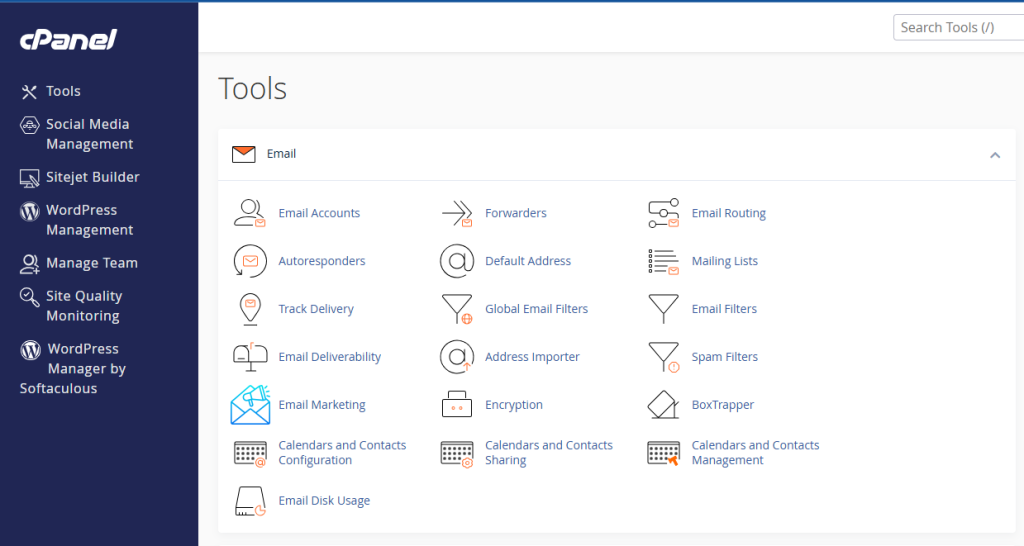
cPanel is a browser-based interface that replaces terminal commands with clear GUI controls:
- File management and FTP configuration, allowing you to upload, edit, and secure files without SSH.
- Domain and DNS tools, letting you park or assign domains and update zone records easily.
- Email account management, enabling setup of mailboxes, filters, autoresponders, and spam controls.
- Database provision and phpMyAdmin access, for managing MySQL or MariaDB with no SQL commands required.
- One-click installs via Softaculous, which make launching WordPress, Joomla, or Magento almost instantaneous.
- SSL installation and security features, like IP blocklists and password protection—all in just a few clicks.
On top of that, WHM (Web Host Manager) adds administrative precision:
- Create and manage separate cPanel accounts—great for agencies, developers, or multiple domains.
- Set package limits and enforce global security configurations.
- Monitor server health with real-time logs and usage charts.
Benefits of Choosing Managed VPS with cPanel
Embracing a Managed VPS hosting with cPanel setup gives you a blend of power and simplicity—exactly what growing websites need. Here are the key advantages:
- Effortless control
You configure domains, SSL certificates, cron jobs, and databases entirely via GUI. No SSH, no command-line syntax errors—just a tight, time-saving workflow ideal for both beginners and pros. - Zero system maintenance
Forget wrestling with routine OS updates, patching vulnerabilities, or reconfiguring firewalls manually. Your provider handles it, so your focus stays on your content, not conflict logs. - Dedicated resources
Your CPU, RAM, and SSD/NVMe storage are irreplaceably yours. That means reliable site performance, even during sudden spikes, heavy ecommerce loads, or data exports. - Reliable backups
Automated daily snapshots and manual restore options mean disaster recovery is just a click away—no third-party tools or DIY scripts needed. - Expert assistance
When technical issues arise—be it a broken email chain, server error, or downtime—help is at hand. Professional teams handle it quickly and efficiently, letting you avoid long searches or lagging forums. - Scalability
Growing is as easy as clicking “upgrade.” Add more RAM, increase CPU cores, or expand storage without rebuilding infrastructure or migrating data.
What a Managed cPanel VPS Costs in 2026 (Licence Included vs Do-It-Yourself)
The honest way to price a managed cPanel VPS is to compare it with the alternative: an unmanaged VPS with the same cores and RAM plus a cPanel licence bought directly from cPanel (list prices, October 2026: Solo 1 account $29.99, Admin 5 accounts $35.99, Pro 30 accounts $53.99, Premier 100 accounts $69.99 per month, all going up 8–10% on 16 December 2026). HostStage’s managed plans include the cPanel/WHM licence, which changes the maths:
| Managed cPanel VPS (HostStage) | Price/mo | Do-it-yourself equivalent | DIY price/mo | What the managed plan adds for the difference |
|---|---|---|---|---|
| Level 1 – 1 core, 1 GB, 20 GB NVMe | $37.45 | Unmanaged Level 1 ($4.95) + cPanel Solo ($29.99) | $34.94 | Kernel updates, security audit, priority support, backups – for $2.51 |
| Level 2 – 2 cores, 2 GB, 50 GB NVMe | $52.45 | Unmanaged Level 3 ($15.95, 40 GB) + cPanel Solo ($29.99) | $45.94 | Same, plus 10 GB more disk – for $6.51 |
| Level 3 – 4 cores, 4 GB, 100 GB NVMe | $67.45 | Unmanaged Level 4 ($29.95, 60 GB) + cPanel Admin ($35.99) | $65.94 | Same, plus 40 GB more disk – for $1.51 |
| Level 4 – 8 cores, 8 GB, 200 GB NVMe | $92.45 | Unmanaged Level 5 ($49.95, 120 GB) + cPanel Pro ($53.99) | $103.94 | Managed is cheaper by $11.49 and has 80 GB more disk |
| Level 5 – 16 cores, 16 GB, 300 GB NVMe | $147.95 | Unmanaged Level 6 ($79.95, 200 GB) + cPanel Premier ($69.99) | $149.94 | Managed is cheaper by $1.99 and has 100 GB more disk |
Read across the last column and the pattern is clear: once the cPanel licence is included, the management layer costs between nothing and a few dollars a month, and from 8 cores up the managed plan is simply cheaper than assembling it yourself. The DIY route only wins if you do not need cPanel at all (a single WordPress site on Nginx, say) or you already hold a cPanel licence from another project.
Managed or unmanaged VPS with cPanel? The 60-second decision
- Pick managed if anyone other than you depends on the server (clients, a shop, a team), if you do not patch Linux at least monthly today, or if a restore from backup would be the first time you ever tried one.
- Pick unmanaged if you already run servers, want a non-standard stack (Nginx, Docker, custom kernels) that cPanel would fight, or you host one site and a $30 licence is most of your budget.
- Either way, count the licence. A $5 VPS plus cPanel is a $35 VPS. For a wider view of the tiers, from shared cPanel hosting to a managed VPS and bare metal, see our Linux web hosting guide.
Key Features to Look For in a Provider
When selecting a Managed VPS with cPanel provider, certain features are non-negotiable. You’ll want to ensure these essentials are covered before committing:
Resource clarity
Providers should clearly state how many CPU cores, how much RAM, and what type of storage is allocated to each VPS tier. This transparency allows you to estimate whether the resources align with your projected traffic and application needs.
Included cPanel/WHM license
Licensing costs can add up unexpectedly. A plan that includes a full cPanel/WHM license ensures that you aren’t hit with surprise monthly fees down the line and keeps your total cost predictable.
Backup strategy
You want daily automatic snapshots, with the ability to restore a single account or the entire server quickly. Providers that offer incremental and full-image backups along with easy rollback options have your data covered in case things go sideways.
Security setup
A layered security approach is essential: stateful firewalls like CSF, routine malware scans, intrusion detection/prevention, and DDoS mitigation should come together to protect your environment from automated attacks and threats.
Service guarantees
Solid providers will offer an SLA of 99.9% uptime or better, with defined response times for support requests (typically under 30 minutes). They should also provide compensation or refunds when uptime commitments are missed.
Global data centers
If your audience is international, having multiple physical locations helps minimize latency and improve loading times. Check that your provider supports data center locations that match your user base for the best experience.
Supported operating system
cPanel runs on AlmaLinux 8 and 9, Rocky Linux 8 and 9, Ubuntu 22.04 LTS and CloudLinux. CentOS 7 has been out of support since June 2024, so a provider still deploying cPanel on it is a red flag: no security patches reach that server. Ask which OS image the plan ships with and whether the provider handles the AlmaLinux major-version upgrade when it comes.
Real-time monitoring and alerting
Tools like CPU and memory usage dips, disk I/O monitoring, and notifications for anomalies help you catch issues early—before they turn into downtime or performance bottlenecks.
Why It Outshines Shared Hosting and Unmanaged VPS

This model delivers a flexible middle ground—giving you control, performance, and ease in a single package:
Shared Hosting:
- You’re restricted to limited resources shared across users, resulting in unpredictable load times and no root access.
- Custom software installs are often disallowed, and you lack control over server-wide settings, which can become frustrating as traffic scales or your tech stack evolves.
Unmanaged VPS:
- You have full root access and powerful resources—but at the cost of managing everything yourself.
- You must handle everything from OS updates to stack configuration, firewall rules, security hardening, and backups—all of which take time and technical expertise.
- Mistakes can lead to downtime, data loss, or security vulnerabilities.
Managed VPS with cPanel:
- You get dedicated resources and root-level control while bypassing administrative overload.
- Everyday tasks like website setup, email configuration, DNS tweaks, SSL installs, and database management are done via a user-friendly interface.
- The provider handles OS-level tasks, security, backups, and monitoring.
- You enjoy scalability with simple upgrades as your needs grow—no migrations, server re-provisioning, or manual configurations.
In short: you control your apps and data, while experts handle infrastructure maintenance, security, and system health. For many users, a managed cPanel VPS is the ideal middle ground between control, speed, and simplicity—especially when technical overhead is a concern.
Who Should Choose Managed VPS with cPanel?
This setup is ideally suited for:
- Agencies & freelancers managing multiple client environments.
They can create separate, secure cPanel accounts for each client, assign individualized resource packages, and avoid cross-site interference while maintaining centralized billing and access control. - E‑commerce operations that demand reliable uptime, fast checkout times, and GDPR/PCI compliance.
Features like SSL, secure backups, DDoS mitigation, and root access allow you to build a secure and performant shopping experience without hiring a full-time sysadmin. - Growing blogs, SaaS businesses, and online services scaling past shared limits.
You gain dedicated resources, maintain an easy-to-use environment, and benefit from backups and security that shared hosting can’t provide. - Developers and web professionals building custom sites, staging environments, or test sandboxes.
You retain root-level customization while offloading system updates, backups, and security monitoring—letting you focus on development instead of server maintenance. - Non-technical users who need power without complexity—like marketing teams, small business owners, or content creators.
You get a professionally managed environment and intuitive control panel without needing to learn Linux or command-line operations.
Top Managed VPS Providers with cPanel in 2026
When choosing a provider for Managed VPS hosting with cPanel, it’s not just about specs or price—it’s about long-term reliability, support, infrastructure, and how well the provider handles the complexity of server management. Here are some of the most trusted names in the industry:
Hoststage

Hoststage is known for delivering high-performance VPS hosting with professional-grade service and infrastructure. Their fully managed VPS plans include licensed cPanel/WHM, advanced security audits, daily backups, and priority support. Hoststage stands out for its blend of technical precision and human support, especially with its global data center coverage and proactive monitoring.
ScalaHosting

ScalaHosting built its reputation on innovation and control panel flexibility. While they offer cPanel, they also developed sPanel as a lightweight alternative, giving users more options. Their platform is known for strong security posture, fast provisioning, and helpful support, making it ideal for users looking for a future-proof setup.
TMDHosting
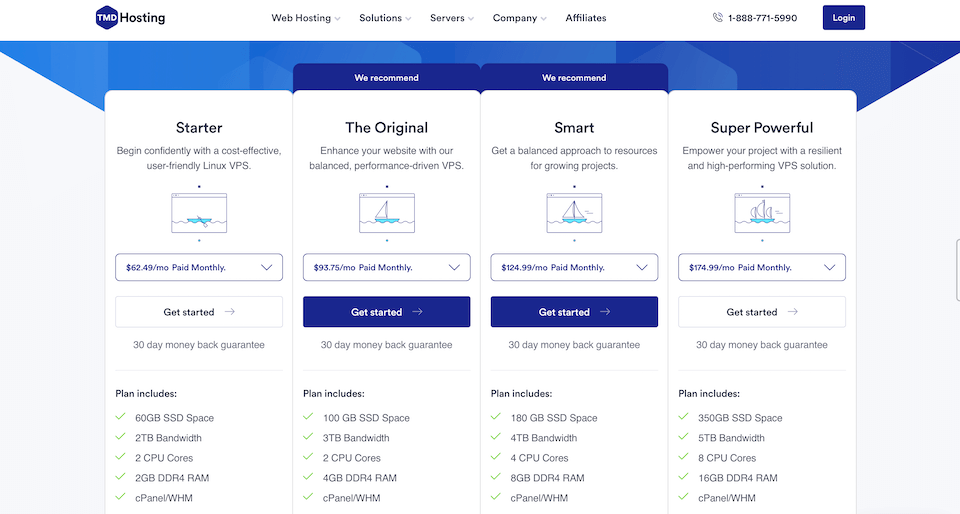
TMDHosting emphasizes simplicity and inclusivity. Their managed VPS plans come with a cPanel license, free SSL, and regular backups out of the box. The platform suits users who want a ready-to-go environment with minimal setup. Their customer service team also receives frequent praise for responsiveness.
A2 Hosting

A2 Hosting, now trading as Hosting.com after its 2025 rebrand, is a developer-friendly provider with a performance-first mindset. Its managed VPS plans include cPanel, advanced caching and real-time threat protection; the plan names and prices changed with the rebrand, so compare the current catalogue rather than older reviews.
Final Words
Managed VPS hosting with cPanel brings autonomy, performance consistency, streamlined operations, and built-in scaling—all without server admin fatigue. It gives you the tools and flexibility of a full server, but without needing to configure and maintain every part of the stack yourself. That balance of control and convenience is exactly what most modern websites need—whether you’re serving dynamic content, managing client accounts, or running a high-traffic store.
As your site or business grows, so do your infrastructure needs. Managed VPS with cPanel is one of the few solutions that scales with you while still staying manageable. It removes technical bottlenecks, improves reliability, and ensures your hosting never becomes a liability. If you want long-term stability without giving up power, it’s the smart choice.
Launch with Confidence Using Hoststage’s Managed cPanel VPS
Start strong with Hoststage’s Level 3 Managed Linux VPS, a plan built for growing websites and serious projects. It includes 4 vCPU cores, 4 GB RAM, and 100 GB SSD storage, powered by enterprise-grade hardware. You also get a fully licensed cPanel/WHM, one-click installers via Softaculous, daily backups, on-demand snapshots, and a 117-point security audit—all backed by a 99.9% uptime SLA and 24/7 priority support with a 1-hour first-response guarantee.
Whether you’re launching client sites, scaling an online store, or hosting a critical app, this plan delivers the performance and support you need without the infrastructure headaches. With Hoststage handling the backend, you’re free to focus on building, growing, and succeeding. It’s power and peace of mind, wrapped in a clean control panel.
Frequently Asked Questions
What is managed VPS hosting?
How does managed VPS hosting handle server updates and maintenance?
Why are managed cPanel VPS plans so expensive?
Can I run cPanel on an unmanaged VPS?