
llms.txt is a proposed Markdown guide to a website’s useful resources. You can publish a short introduction and selected links for tools that support it. It does not make an AI service read, cite or recommend your content.
This guide covers an implementation you can maintain: choose the scope, write the file, serve it as text, and verify the deployed response. The current proposal is v2, revised in August 2026; it is still a proposal rather than a universal crawler requirement.
Decide what llms.txt can do for your site
Consider it when your documentation has competing versions, scattered support pages or an unclear starting point. Before adding another file, identify the reader’s task and the current public pages that answer it. A small, well-linked site may need no additional directory.
Google’s guidance for AI features in Search says no new AI text file is required for AI Overviews or AI Mode. Keep useful visible content, internal links and ordinary crawl/index controls as priorities. A valid file is an implementation result, not evidence of better rankings or citations.
| Resource | Job | Boundary |
|---|---|---|
| llms.txt | Curated context and resource links | Use depends on the client |
| robots.txt | Crawling rules for cooperating bots | Not authentication |
| XML sitemap | URL discovery for search engines | Not a reading order or access grant |
The Robots Exclusion Protocol is not a security control. Protect private documents with authentication and permissions. Neither listing a URL nor leaving it out of llms.txt changes who may access it.
Show clients where the useful documentation lives
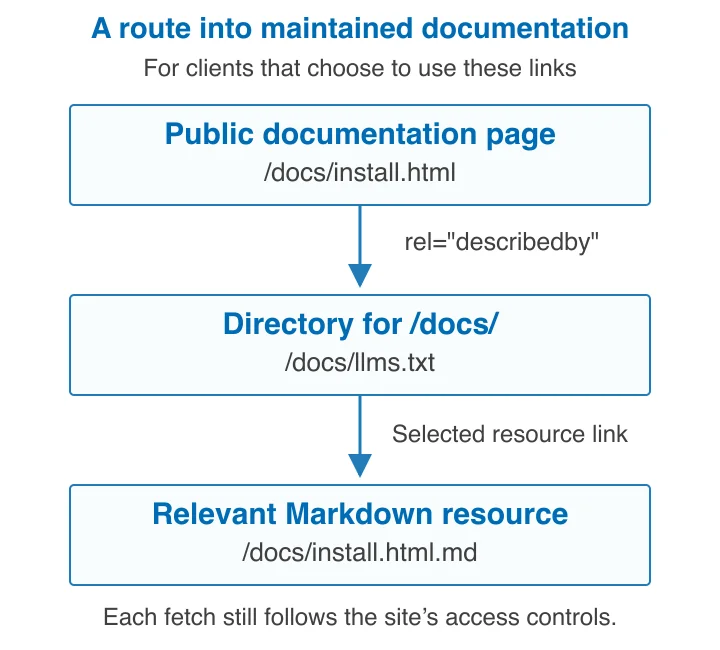
The v2 changes clarify scope: a file can cover the site root or a subtree such as /docs/, with the most specific applicable file taking precedence. They also recommend discovery links between a page, its Markdown alternative and the relevant llms.txt.
For a page at /docs/install.html, the following HTML belongs in that page’s head. Use it only after those two target files exist; adapt the paths to your real site.
<link rel="describedby" href="/docs/llms.txt">
<link rel="alternate" type="text/markdown" href="/docs/install.html.md">
A supporting client can locate the directory and then fetch the material relevant to its task. The diagram describes that relationship, not a measured crawler journey. The Optional heading remains a convention for secondary links; it is not a command that every client must execute.
Source: llms.txt v2 changes, August 2026, checked 12 November 2026. Access controls still apply to each request, and individual tools decide whether to follow the proposal.
Write a small, useful Markdown file
The published format starts with an H1 naming the site or project. It may add a summary blockquote, explanatory text, and H2 link lists. It does not require invented fields such as schemaVersion or crawlRate.
Here is an example for a documentation subtree. Replace the example domain and links with real public resources. Prefer maintained, readable Markdown targets where available; a filename ending in .md is useful only if it actually returns that content.
# Example Documentation

> Current public guides for installing and operating Example.

Use the current release documentation below. Older releases are not covered.

## Start here

- [Installation](https://example.com/docs/install.html.md): Prerequisites and installation steps.
- [API reference](https://example.com/docs/api.md): Supported endpoints and authentication.
- [Troubleshooting](https://example.com/docs/troubleshooting.md): Diagnose common setup failures.

## Optional

- [Release notes](https://example.com/docs/releases.md): Changes between supported releases.
Keep descriptions specific enough to choose between resources. Separate current and archived versions deliberately. Review linked content for credentials, internal addresses and unpublished material before exposing it. Do not copy an entire sitemap into this file merely to maximize its length.
Assign an owner and keep the source in the same repository or documented publishing workflow as your website. A release that moves a guide should update its directory entry in the same change.
Serve the file without weakening access controls

A static text file needs no database or dedicated AI server. On a cPanel site, open File Manager, identify the correct domain’s document root, and upload the file into the directory matching its intended URL. The cPanel File Manager documentation explains document-root navigation, editing and permissions. A root-level file and a /docs/llms.txt file have different filesystem destinations.
Use UTF-8 and a suitable text media type. Check the live response before changing server configuration: an existing static-file setup may already work. CORS governs browser-script access across origins; it is not a prerequisite for ordinary server-to-server HTTP fetching. Add a CORS policy only for an integration that needs it, as described in MDN’s CORS guide.
Apache example
If an Apache site serves the wrong type and permits FileInfo overrides, this scoped rule can go in the relevant directory’s .htaccess. Back up the existing file first. Do not replace your rewrite or security rules.
<Files "llms.txt">
    ForceType text/plain
    AddDefaultCharset UTF-8
</Files>
Apache’s ForceType reference documents the directive and allowed contexts. On another server stack, use its supported settings instead. For broader Apache context, see HostStage’s .htaccess guide.
Nginx example
With an existing server block whose root already points to the public directory, this exact location serves the documentation-scoped file and returns 404 when it is missing. The empty types block prevents an inherited extension mapping from overriding the chosen default type.
location = /docs/llms.txt {
    types { }
    default_type text/plain;
    charset utf-8;
    try_files $uri =404;
}
The Nginx core reference documents location matching, types and try_files. For a systemd installation, validate before reloading:
sudo nginx -t && sudo systemctl reload nginx
These are configuration examples, not a claim that your host uses Apache, Nginx or systemd. Shared-hosting users should use panel-supported settings or support; managing a custom web server instead requires suitable administrative access.
Give the publishing account write access and the web server read access. Avoid world-writable files or recursive permission changes. Keep secrets out of the published tree; llms.txt cannot make a private URL safe.
Check the response and cache freshness
Run a real GET after deployment. This Bash example saves headers and body into a unique temporary directory, rejects HTTP errors and redirects, and verifies that the response body matches the repository file. Change both paths first. It checks delivery integrity, not full Markdown conformance.
#!/usr/bin/env bash
set -euo pipefail

LLMS_SOURCE="public/docs/llms.txt"
LLMS_URL="https://example.com/docs/llms.txt"
LLMS_CHECK_DIR="$(mktemp -d)"
trap 'rm -rf "$LLMS_CHECK_DIR"' EXIT

test -f "$LLMS_SOURCE"
LLMS_STATUS="$(curl --fail --silent --show-error \
    --max-time 20 \
    --dump-header "$LLMS_CHECK_DIR/headers.txt" \
    --output "$LLMS_CHECK_DIR/body.txt" \
    --write-out '%{http_code}' "$LLMS_URL")"

test "$LLMS_STATUS" = "200"
grep -Eiq '^content-type:[[:space:]]*text/(plain|markdown)(;|[[:space:]]|$)' \
    "$LLMS_CHECK_DIR/headers.txt"
cmp "$LLMS_SOURCE" "$LLMS_CHECK_DIR/body.txt"
printf 'Expected text response and exact file bytes verified.\n'
curl’s manual explains the response-code, output and header options. Inspect the saved body if a CMS, login page or challenge is returned. A successful status alone does not establish that the response is your file.
| Observation | Next check |
|---|---|
| 404 | Confirm hostname, document root, filename and scope |
| 301 or 302 | Use the intended final HTTPS URL and inspect the redirect |
| 200 with HTML | Inspect application fallback, authentication or bot challenge |
| Old body | Compare origin and CDN responses, then purge the affected object |
| Broken listed link | Repair the destination and directory entry together |
For a public file, an illustrative cache policy is:
Cache-Control: public, max-age=300, s-maxage=3600
Under HTTP caching rules, this permits five minutes of freshness in private caches and one hour in shared caches. Those durations are configuration choices, not measured performance or a requirement of llms.txt. Choose them around your update and purge process. Let the server generate validators from the real file; do not hardcode an ETag that outlives its content.
After an urgent change, invalidate the actual root or subtree path you deployed. Repeat the GET and byte comparison through the public URL. A cache-header label by itself does not prove every edge serves the new body.
Maintain links and measure use honestly
Check both the file and its destinations during releases. An automated link check can find errors, while a person still needs to confirm that the linked advice is current. Check generated output for stale versions before publishing it.
Server or CDN logs can show requests, response status and transferred bytes. A request proves a fetch; it does not prove parsing, citation or an improvement in answer quality. User-agent text can be spoofed. Use a provider’s published verification procedure when attributing traffic to a particular crawler.
Keep separate observations for file delivery, subsequent requests and any answers you inspect. If evaluating answer quality, preserve the prompts, dates, tool/model versions and scoring method. Concurrent content changes and service updates prevent a simple before/after count from proving causation.
No comparable dataset was available in the proposal or Google guidance reviewed for this article to quantify a citation, latency or crawl-cost gain. Start with a maintained directory and verified delivery; expand only when your own recorded usage justifies the work.
Frequently asked questions
Is llms.txt mandatory for Google AI features?
No. Google says no additional AI text file is required for AI Overviews or AI Mode. Continue meeting its normal crawling, indexing and content requirements.
Can I publish it under /docs/ instead of the root?
Yes. V2 explicitly describes subtree scope. Publish the file where the content lives and make discovery links point to that exact location. Do not assume a root file describes every separate documentation host.
Will it block training or stop unwanted crawlers?
No. It is a content guide, not an authorization mechanism. Use the relevant crawler controls and enforce authentication or network restrictions where access must actually be prevented.
Do I need a VPS or a generator?
No. You can maintain the file as text on an existing website. A generator may help larger documentation sets, but its links and output still need review. Use a VPS when your application or server-management needs justify it, not merely for this file.
Should I create llms-full.txt too?
Only if a particular tool or workflow needs a consolidated document and you can keep it current. V2 centers on finding relevant linked material and removes the old context-expansion tooling from the proposal. A larger companion file is not a prerequisite for publishing the directory.