
An IPTV hosting setup needs two working paths: an encoder must send video to the server, and viewers must retrieve a playable stream from it. Opening an RTMP port solves only the first half. This guide connects a single H.264/AAC live feed to HLS delivery on an Ubuntu VPS, with restricted publishing and checks at each stage.
Use video you own or have permission to distribute. The starting point is a fresh Ubuntu 24.04 LTS server, a working sudo account and an encoder such as OBS. This is a single-channel setup; subscriptions, DRM and an adaptive bitrate ladder require additional components.
Size the VPS for the actual streaming workload
Separate packaging from transcoding before choosing a plan. Packaging an already compatible H.264/AAC feed into HLS segments is different work from decoding and re-encoding every frame. The configuration below packages the incoming feed. It does not create lower-resolution renditions or change its bitrate.
There is no reliable universal minimum that guarantees smooth delivery. Rehearse the actual resolution, frame rate, codec and audience load. Watch CPU saturation, memory pressure, disk space and sustained outbound traffic. A server that handles one incoming feed can still run out of delivery bandwidth as viewers join.
Choose a region by checking routes from both the encoder and the audience. Geographic proximity is a useful starting point, but does not guarantee a particular latency. Player buffering, segment duration and network congestion also affect the experience. For the broader design choices, see setting up a video streaming server on a VPS.
HostStage’s Streaming VPS range provides different CPU, RAM, storage and unmetered bandwidth tiers. Treat those specifications as inputs to your test plan. They are not a promised viewer count or evidence that a particular transcoding preset will run in real time.
Separate ingest from audience delivery
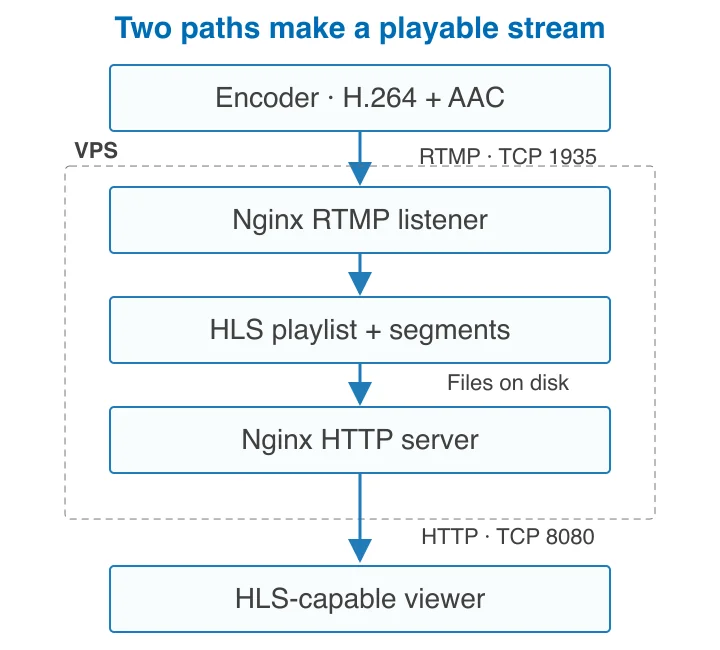
The encoder publishes an RTMP feed to Nginx. The RTMP module writes an HLS playlist and media segments to disk; Nginx’s HTTP server serves those files to viewers. A successful encoder connection does not prove that the playlist is reachable. Test both paths.
The diagram follows the nginx-rtmp project’s HLS configuration, checked 27 October 2026. It describes this setup’s connections, not measured performance. For this path, encode video as H.264 and audio as AAC before sending it to the VPS. FFmpeg is useful when conversion is required, but adding it as a second packager is unnecessary here.
| Connection | Purpose | Access |
|---|---|---|
| SSH · TCP 22 | Admin access | Your admin IP |
| RTMP · TCP 1935 | Encoder publishes video | Your encoder IP |
| HTTP · TCP 8080 | Initial HLS playback test | Your test viewer IP |
| HTTPS · TCP 443 | Public HLS delivery after TLS setup | Audience or approved CDN |
The initial HTTP test is deliberately restricted. Before public delivery, configure a hostname and TLS, then update the delivery rules. A stream name is not authentication: this example protects publishing by address, while viewer authorization is a separate decision.
Prepare Ubuntu and protect administrator access
Start with your provider’s documented login method. Confirm that a non-root sudo account can log in with an SSH key in a second terminal before disabling passwords or root access. Keep the original session and recovery console available. Follow Ubuntu’s OpenSSH instructions; validate any SSH configuration change with the following command before reloading the service. Run the reload only after the syntax check passes.
sudo sshd -t && sudo systemctl reload ssh.service
Install the packages from Ubuntu’s repositories, then check the actual installed versions and module files. If the RTMP package has no installation candidate, check your release and enabled repositories instead of copying a random binary or ignoring the error.
sudo apt update
sudo apt install nginx libnginx-mod-rtmp
dpkg-query -W nginx libnginx-mod-rtmp
ls -l /etc/nginx/modules-enabled/
On a standard Ubuntu package installation, the Nginx main configuration loads enabled dynamic modules from /etc/nginx/modules-enabled/. Confirm that the RTMP module is present. An “unknown directive rtmp” error later means the module has not loaded; resolve it before continuing.
Replace every example address below: 198.51.100.10 is the administrator, 198.51.100.20 the encoder and 198.51.100.30 the test viewer. These are documentation addresses, not usable servers. Preserve existing firewall rules and use your real SSH port if it differs from 22. Mirror the required rules in any provider firewall.
sudo ufw status numbered
sudo ufw allow from 198.51.100.10 to any port 22 proto tcp
sudo ufw allow from 198.51.100.20 to any port 1935 proto tcp
sudo ufw allow from 198.51.100.30 to any port 8080 proto tcp
sudo ufw enable
sudo ufw status numbered
Only enable UFW after confirming that the administrator rule covers your current connection. Test a new SSH login immediately. If encoder or administrator addresses change, update their rules; do not leave publishing open to everyone as a workaround. Ubuntu’s firewall documentation explains address-specific rules.
Configure RTMP ingest and HLS output
Create the segment directory for the Nginx worker account. The commands assume the Ubuntu package’s www-data worker; check the user directive in your main configuration if you have customized it.
sudo install -d -o www-data -g www-data -m 0755 /var/www/iptv/hls
Create /etc/nginx/rtmp.conf with the complete block below. Replace the encoder address with the same address used in your firewall. Local publishing is allowed for controlled tests; direct RTMP playback is disabled because viewers use HLS.
rtmp_auto_push on;
rtmp {
    server {
        listen 1935;
        application live {
            live on;
            record off;
            allow publish 198.51.100.20;
            allow publish 127.0.0.1;
            deny publish all;
            deny play all;
            hls on;
            hls_path /var/www/iptv/hls;
            hls_fragment 4s;
            hls_playlist_length 24s;
            hls_cleanup on;
        }
    }
}
In /etc/nginx/nginx.conf, add this include once at the top level, outside both the events and http blocks. Do not replace the existing file or its module includes.
include /etc/nginx/rtmp.conf;
The four-second fragment and 24-second playlist window are configuration starting points, not a latency guarantee. Keep the encoder’s keyframes regular; a two-second keyframe interval is a practical test setting. The module’s HLS directives explain the fragment, playlist and cleanup controls. Cleanup limits obsolete media accumulation; monitor free space anyway.
Create /etc/nginx/sites-available/iptv.conf with the following HTTP test server. It uses port 8080 so the normal port 80 default site does not intercept the test. The alias maps the requested HLS path to the actual segment directory, and the file types identify playlists and transport-stream segments.
server {
    listen 8080;
    server_name _;
    location /hls/ {
        alias /var/www/iptv/hls/;
        types {
            application/vnd.apple.mpegurl m3u8;
            video/mp2t ts;
        }
        add_header Cache-Control "no-cache";
        autoindex off;
    }
    location / {
        return 404;
    }
}
Enable that site only if the destination symlink does not already exist, then validate the full configuration. Resolve any conflicting server-name/listen directives on an existing installation. The Nginx alias documentation is the reference for the path mapping.
sudo ln -s /etc/nginx/sites-available/iptv.conf /etc/nginx/sites-enabled/iptv.conf
sudo nginx -t && sudo systemctl reload nginx
sudo systemctl enable nginx
sudo ss -ltnp
Continue only when the syntax check succeeds and the expected listeners appear. Do not use a forced overwrite to resolve a symlink or configuration conflict.
Send a stream and verify playback

In OBS, select a custom streaming service. Set the server to rtmp://YOUR_SERVER_IP/live and the stream key to stream. Use H.264 video and AAC audio, then start the feed. The resulting playlist is /hls/stream.m3u8; changing the stream name also changes the playlist name.
Use an encoder bitrate your uplink can sustain. Check its dropped-frame and encoding-lag indicators, then verify that fresh files appear on the server. The commands below inspect the playlist and listeners; they do not measure supported audience capacity.
sudo ls -lh /var/www/iptv/hls/
sudo tail -n 12 /var/www/iptv/hls/stream.m3u8
sudo tail -n 30 /var/log/nginx/error.log
From the allowed viewer address, request the playlist and open the same URL in VLC or another HLS-capable player. Replace the server address. A successful HEAD request alone is insufficient: retrieve the playlist, confirm that its referenced segments return successfully, and watch actual audio/video playback.
curl --fail --show-error http://YOUR_SERVER_IP:8080/hls/stream.m3u8
vlc http://YOUR_SERVER_IP:8080/hls/stream.m3u8
Some browsers need an HLS JavaScript player instead of opening a playlist directly. Keep the player and stream on the same origin for the first browser test. If you later use a different origin, configure CORS for that specific player origin and test both playlists and segments. Do not assume a wildcard CORS header controls who is allowed to watch.
If you need FFmpeg for file input or transcoding, first verify the required codecs in your build and test a separate processing path. Re-encoding changes CPU load, quality and keyframe behavior. The FFmpeg HLS muxer documentation describes its independent HLS options; avoid having FFmpeg and nginx-rtmp write the same output files. For encoder choices, see FFmpeg versus OBS.
Prepare for public delivery and recovery
A restricted HTTP smoke test is not a finished public streaming service. Before opening viewer access, point a real hostname at the server, install and verify its TLS certificate, and serve the player and HLS over HTTPS. Preserve the ingest address restriction. Plain RTMP does not encrypt the encoder feed; use an appropriately configured encrypted tunnel or an ingest service with secure transport when the feed requires confidentiality.
Decide who may view the content. A private or paid channel needs viewer authorization at the delivery layer; a hard-to-guess playlist name is insufficient. If using a CDN, verify its HLS behavior, origin restrictions and caching policy. Tune caching only after confirming that a player does not receive a stale playlist.
Test recovery deliberately: disconnect the encoder, reconnect it, and check that the playlist advances again. Reboot the VPS during a rehearsal and confirm Nginx returns and the encoder reconnects. Enabling a server service does not start an encoder on another machine. Keep configuration backups and monitor the age of the latest playlist as well as server health.
| Symptom | Check first |
|---|---|
| Encoder cannot connect | Publisher address, both firewalls, RTMP listener and application name |
| No playlist appears | H.264/AAC input, active publisher, worker permissions and Nginx error log |
| Playlist loads but playback fails | Segment URLs, MIME types, codec support and player error details |
| Playback stalls under load | Uplink and outbound traffic, CPU/memory pressure, disk and player buffering |
| Playback stays on old content | Playlist modification time, encoder reconnection and cache behavior |
Scale from these observations. Add transcoding renditions only when viewers need them and the measured workload fits. For a more detailed planning framework, use the dedicated streaming server guide. Keep a record of the tested stream settings and audience conditions so the next upgrade addresses the actual bottleneck.
FAQ
Do I need FFmpeg to produce HLS?
Not for the compatible H.264/AAC input used here: nginx-rtmp can package it into HLS. Add FFmpeg or another transcoder when you need to change codecs, resolution or bitrate, and test the additional processing load.
Does a two-vCPU VPS support a fixed number of viewers?
No. Encoding work, stream bitrate, available bandwidth, concurrent viewers and network conditions all matter. Provider specifications describe resources; a realistic load test establishes whether your configuration is suitable.
Why can OBS connect while the playlist returns 404?
Ingest and delivery are separate. Check the stream name, active compatible input, segment-directory permissions and HTTP path mapping. A playlist does not exist merely because port 1935 is listening.
Is the stream key enough to protect publishing?
No. In this example it names the stream. Publishing is restricted to the encoder address by the firewall and RTMP access rules. More complex deployments need a deliberately implemented authentication mechanism.
Is a four-second segment a four-second live delay?
No. Encoding, keyframe timing, packaging, network transfer and player buffering all contribute. Measure end-to-end delay with the actual encoder and player instead of treating one configuration value as a guarantee.