
A Forex VPS speed comparison is useful only when it measures the route to the trading server your account actually uses. Start with that endpoint, run the same checks from each shortlisted VPS, and compare connection stability alongside response time. A low advertised ping is not enough to choose a provider.
This guide focuses on retail MT4 and MT5 setups running frequent or automated trades. It explains how to build your own provider comparison; it does not present a tested ranking or promise faster fills. The practical goal is to identify a suitable route, enough resources for your terminals, and a recovery process you can operate.
Define the workload before comparing speed
Write down your platform, broker server name, number of terminals, Expert Advisors (EAs), and the hours during which they need to run. Also note any trade copier, external data feed, or other application the setup depends on. These details make a provider’s recommendation useful and give you a consistent test workload.
Keep the comparison focused on your current problem. If the terminal stops when your home computer sleeps, continuous operation is the first requirement. If the terminal stays connected but reacts slowly, investigate the broker route and resource use separately. An extra vCPU will not shorten a distant network path.
For a Windows desktop workflow, HostStage’s Forex VPS plans include a Windows license, Remote Desktop access, and full administrator access. Those features let you install and manage your terminal; they do not establish a latency result for your broker. If you are setting up the platform for the first time, follow the MT4/MT5 installation guide before comparing performance.
Separate network latency from order execution
Network round-trip time (RTT) measures a request’s journey to a destination and back. Order execution involves additional steps after the trading server receives a request. Keep these measurements separate when a provider, broker, or monitoring tool quotes a speed figure.
MetaQuotes documents MT5’s TERMINAL_PING_LAST as the most recent ping to the trade server, expressed in microseconds. It is not a fill-time measurement. Its OrderSend documentation also explains that a successful return can mean an order was accepted for further processing, rather than that a trade has already executed.
| Measurement | What it tells you | What it does not prove |
|---|---|---|
| ICMP ping | Echo-response times and reachability to the tested address. | The broker’s processing time or whether the trading connection behaves identically. |
| TCP connection test | Whether a connection can be established to the tested host and port, and how long that takes. | The time to execute an order over an established trading session. |
| Platform ping | The platform’s reported connection latency to its trade server. | Guaranteed execution speed, price, or liquidity. |
| Order and deal records | The recorded stages and outcomes of trading requests. | A pure network benchmark unless the measurement method separates the stages. |
The definitions above follow the Windows ping reference, Microsoft’s PsPing documentation, and MT5 terminal properties. Compare like with like: a TCP connection time should not be ranked against another provider’s platform ping.
Variation matters as well as the average. Keep the individual response times or a distribution from your monitoring tool so that occasional slow responses remain visible. If a report labels a value “jitter,” check its calculation before comparing it with another report. A minimum-to-maximum spread is useful context, but it is not automatically the same metric.
Run a repeatable test from each VPS
Run the checks inside the VPS’s Windows session, not on your home computer. Ask the broker to confirm the hostname or IP address relevant to your account and, for a TCP test, the correct port and whether diagnostic connections are permitted. A broker’s website address is not a substitute for its trading endpoint.
1. Record the conditions
For every run, save the VPS plan and location, Windows and platform versions, broker server, date, time zone, test tool, and sample count. Use the same terminals and EA configuration on each candidate. Keep demo and live server results in separate records; a result from one endpoint is not evidence for the other.
2. Check reachability and response times
Open PowerShell inside the Windows VPS. Replace broker-server.example.com below with the broker-confirmed destination, then run this bounded ICMP check:
ping.exe /n 300 broker-server.example.com
The command requests 300 echo responses and ends automatically. Save the output, including timeouts and the summary. The count is a practical starting sample for this procedure, not a certification threshold or a provider benchmark. Repeat the same check during the market sessions in which your setup normally runs.
If the hostname cannot be resolved, verify it with the broker. If requests time out while the trading platform remains connected, do not immediately label the VPS faulty: the destination may not answer ICMP. Stop the test with Ctrl+C if needed, and check the platform’s connection record. Microsoft PsPing supports a separate TCP connection test when you have a confirmed endpoint and port; keep that result in its own column.
3. Observe the terminal under its normal workload
Alongside the network test, watch CPU, memory, and disk activity in Task Manager. Review the platform and EA logs for disconnections, errors, or delayed processing. If the network results remain stable while the terminal becomes sluggish, investigate the workload before changing location. Keep strategy testing separate from infrastructure diagnostics; this procedure does not require placing live trades.
Repeat on more than one day before drawing a long-term conclusion. A short successful test describes that observation window. It does not establish monthly uptime, and the quietest result should not replace the record from the hours you actually trade.
Choose a location using the broker route
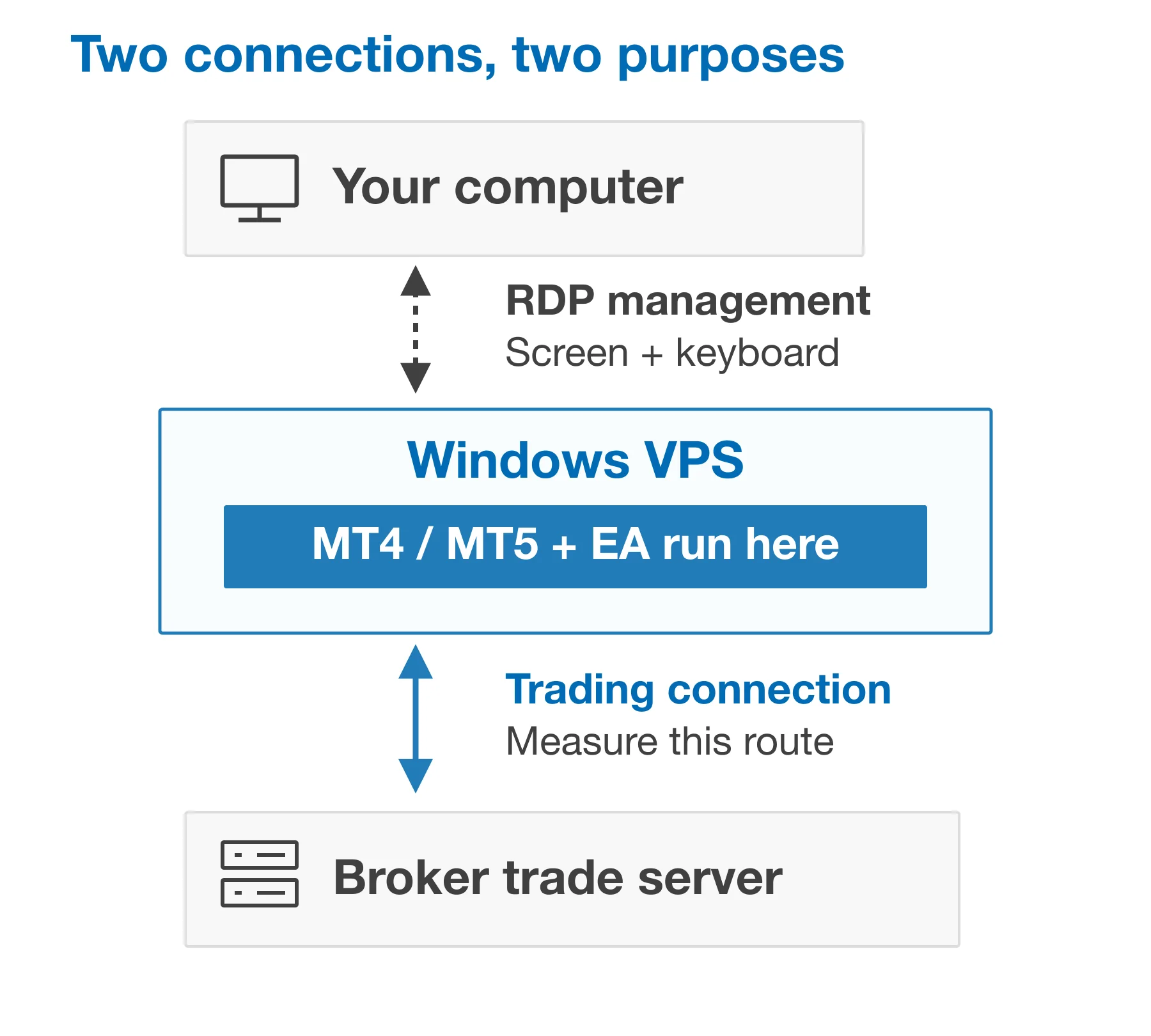
Start with the location of your account’s trading server, then compare the available VPS routes to it. Your own location mainly affects your Remote Desktop connection; the terminal running on the VPS has its own connection to the broker. A smooth remote desktop and a good broker route are separate checks.
A nearby VPS location is a useful candidate, but the city name is not the result. Ask for a test address or a way to evaluate the relevant location, then confirm the route from the actual VPS you will use. A provider’s looking glass or sample server can help you shortlist locations; it should not replace the final check from your assigned machine.
If you use more than one broker, measure every required endpoint. Choose the route that fits the most important workload, or evaluate separate terminals in different locations when the additional management is justified. The guide to choosing a Forex VPS location covers that location decision in more detail.
Compare providers with the same decision sheet
Build one record per candidate using the fields below. Keep provider claims, contract terms, and your observations distinct. If a provider cannot supply evidence for a requirement, record the gap rather than giving it an invented score.
| Criterion | Evidence to record | Decision it supports |
|---|---|---|
| Broker route | Exact endpoint, VPS location, test method, and observation window. | Whether the result applies to your account. |
| Latency and variation | Comparable response-time samples, summary, and slow-response distribution. | Which route stays responsive during your required sessions. |
| Connection continuity | Timeouts, terminal disconnects, and reconnection logs. | Whether interruptions need investigation before migration. |
| Resource headroom | CPU, memory, and disk behavior with your terminals and EAs running. | Whether configuration changes or more resources are justified. |
| Recovery and support | Backup responsibility, restore procedure, maintenance policy, and support scope. | Whether you can recover the working setup. |
| Trial and total cost | Eligibility, cancellation deadline, license costs, and recurring charges. | Whether you can evaluate and operate the service within your budget. |
Prefer a candidate that meets your workload and continuity requirements throughout the tested sessions. If two routes are similar, use recovery, support, and operating effort to decide. If one route has unexplained interruptions, investigate those before treating a slightly lower average ping as an advantage.
Read trial and refund terms before ordering multiple test servers. HostStage’s terms of service contain exclusions and limit its money-back guarantee to one service; they also make customers responsible for regular backups. An evaluation plan should reflect those conditions rather than assume every purchase is refundable.
Keep the trading terminal available
Once you choose a VPS, retain the test record as a baseline. Recheck the route when the broker changes a server, you move the VPS, or a new workload changes how the machine behaves. Diagnose one change at a time so that you can tell what helped.
- Keep the workload deliberate. Remove unused charts, indicators, and symbols after confirming that your EAs do not depend on them. MetaQuotes recommends limiting unnecessary charts and Market Watch symbols in its environment preparation guidance.
- Plan updates and restarts. Use a maintenance window and verify the terminal, broker connection, and automation afterward. Disabling security updates permanently is not a performance strategy.
- Prepare a recoverable copy. Keep the platform settings, EA inputs, and required installation files in a protected backup. Test restoration before depending on it during an interruption.
- Check the whole chain. A reachable VPS does not prove that the terminal is connected or that an EA is operating. Include application health in your checks and know how to regain access if Remote Desktop fails.
Use the decision sheet to identify the location and resources you need, then review HostStage’s Forex VPS options. Confirm the broker route and test your actual terminal workload before moving the working setup.
FAQ
Which Forex VPS provider is fastest for my broker?
The answer depends on the exact trading endpoint, VPS location, and test period. Compare each candidate from the VPS itself using the same method. A published number for another broker server or platform does not settle the decision for your account.
Does a lower ping guarantee faster fills?
No. Ping describes a network measurement. The broker still has to process the order, and the eventual execution depends on the trading request and market conditions. Inspect order and deal records separately from network tests.
Why does ping fail while MT4 or MT5 still connects?
The destination may not answer ICMP echo requests even when its trading service is reachable. Verify the endpoint with your broker, review the platform’s connection record, and use a broker-approved TCP check if appropriate.
Will adding more vCPUs solve latency spikes?
Additional resources may help an overloaded terminal, but they do not directly shorten the network route. Compare resource use with the timing of the problem. Stable network tests and high resource use point to a different investigation from repeated connection interruptions.
Should I choose a VPS near me or near the broker?
For an automated terminal running on the VPS, prioritize the measured route from that VPS to the broker’s trading server. Also check that your own Remote Desktop connection is usable for maintenance. The two connections serve different purposes.