
A VPS resolves many of the challenges that local machines face: unstable latency, unexpected reboots, power loss, memory issues, and IP changes. This article details five failure modes that can disrupt real-money trading bots and explains how a carefully configured VPS environment keeps them running around the clock.
Trade with lower latency and higher reliability
Deploy your Windows Forex VPS close to major brokers and trading hubs.
Benefit from stable connectivity, low-latency routes, and 24/7 uptime for your Expert Advisors and trading platforms..
⚡ Instant Setup
Failure Mode #1: Power Management and System Sleep Interrupts Trading

Your bot can stay active even if you step away, but the operating system may not. When a computer enters sleep mode, live market connections drop instantly. Bots that depend on persistent WebSocket streams for order updates will miss critical signals once network interfaces shut down and TCP sessions expire. Although processes might appear to run after a wake-up, their market connection remains stale.
The default sleep settings on many consumer laptops are far more aggressive than expected:
| Environment | Default Sleep Behavior | Typical Idle Timeout | Resulting Downtime |
|---|---|---|---|
| Windows 11 laptop (battery) | Sleep enabled | 5–15 minutes | 2–8 hours/day |
| Windows 11 laptop (plugged in) | Display off + sleep | 15–30 minutes | 1–4 hours/day |
| macOS MacBook | Automatic sleep + Power Nap | 10–20 minutes | 2–6 hours/day |
| VPS instance | No sleep state | N/A | ~99.99% uptime (~4.3 min/month downtime) |
Consumer laptops are optimized for battery life, not continuous trading. For example, a bot that starts monitoring at 2:13 PM might be interrupted when a laptop sleeps at 2:20 PM, causing it to miss a critical market move between 2:24 PM and 2:26 PM. This is especially disruptive for market-making or arbitrage bots that rely on continuous price synchronization. With a VPS, there is no sleep state, and uptime is maintained.
Detecting Sleep-Induced Disconnects
Sleep-related issues leave clear traces in your logs. Look for these indicators:
- Gaps in timestamps exceeding 10 minutes
- Repeated WebSocket “ping timeout” errors
- SSL/TLS handshake retries
- Order book desynchronization warnings
- API reconnect loops after inactivity
Common log examples:
[14:20:11] WebSocket disconnected: ping timeout
[14:20:12] Attempting reconnect...
[15:01:43] Reconnected successfully
[15:01:44] Order book snapshot outdated, resyncing
On Windows, you can confirm sleep events with:
powercfg /systemsleepdiagnostics
On Linux-based systems, check for suspend activity with:
last -x | grep shutdown
A VPS prevents these issues by maintaining uninterrupted power and network connectivity.
Failure Mode #2: ISP Flakiness and Dynamic IP Disrupt Bot Sessions
Even when your bot remains powered on, home internet connections can be unreliable. Residential ISPs assign IP addresses dynamically using DHCP, so a modem reconnect or a lease renewal can change your public IP address mid-session. For trading bots that require authenticated API sessions and persistent WebSocket feeds, such an IP change can break connections suddenly.
A typical chain of disruption includes:
- A brief ISP hiccup (20–90 seconds)
- Router reconnection and IP reassignment
- WebSocket sessions invalidated
- API errors due to authentication failures
- Bot entering a reconnect loop during volatile market moves
In contrast, a VPS provider network features redundant upstream carriers, BGP rerouting, and minimal packet loss—ensuring stable connectivity during even the fastest market events.
Failure Mode #3: CPU Throttling and Resource Contention Crash Your Bot

Even with an ideal internet connection, a laptop’s hardware may not keep pace. Under sustained load, laptops can experience CPU throttling as temperatures soar, causing the processor to reduce clock speed to avoid overheating. This drop in performance can delay critical processing tasks:
- Parsing WebSocket feeds
- Recalculating probabilities
- Signing API requests
- Updating order books
CPU throttling can cause response times to spike from 40–60ms up to 300–800ms, potentially missing arbitrage opportunities. Signs of thermal throttling include:
- CPU usage at or near 100%
- Noticeable delays in order submissions
- Lag in processing time-sensitive calculations
Monitoring tools like Task Manager on Windows or Activity Monitor on macOS can help you identify these issues. A VPS, with dedicated vCPUs and minimal background processes, avoids these resource contention problems. For more insight, read why Windows VPS are priced differently from Linux VPS to understand the cost of performance efficiency.
Failure Mode #4: OS Updates and Reboots Kill Your Live Bot
Consumer operating systems are configured to apply updates automatically, which can lead to sudden reboots. A bot that is actively trading can be interrupted by an OS reboot triggered by patch updates or user-initiated maintenance.
A typical scenario unfolds as follows:
- A trading bot operates during market hours
- OS update notifications appear
- The system reboots automatically during an idle period or overnight
- The bot fails to restart if manual login is required
This is especially risky during times of market volatility. Instead of dealing with unpredictable updates, a VPS allows for controlled maintenance windows where updates can be scheduled deliberately.
Checklist: Prevent Trading-Hour Reboots
Windows:
- Go to Settings → Windows Update → Advanced Options → Active Hours to block auto-restarts during trading times.
- For Windows 11 Pro, use Group Policy (`gpedit.msc`) to set updates to “Notify for download and auto install”.
macOS:
- Adjust System Settings → General → Software Update to disable automatic OS updates while keeping essential security patches.
After making these adjustments, verify that there are no pending reboot commands:
Windows:
Get-ItemProperty "HKLM:\SOFTWARE\Microsoft\Windows\CurrentVersion\WindowsUpdate\Auto Update\RebootRequired"
macOS:
softwareupdate -l
With a VPS, updates can be managed to avoid disruptive reboots and maintain continuous trading.
Failure Mode #5: Time Drift and Certificate Errors Break API Handshakes
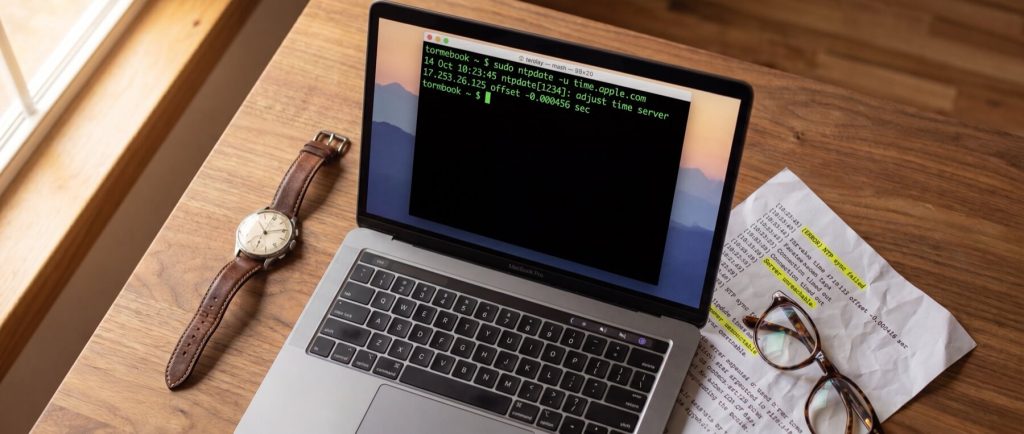
Even if a system is running continuously, slight clock drifts can disrupt API communications. Trading APIs use TLS certificates and time-sensitive authentication, so even a few seconds of drift can lead to errors like “certificate not yet valid” or “expired.” Errors might look like:
requests.exceptions.SSLError: certificate verify failed: certificate has expired
TLS handshake failed: x509 certificate is not yet valid
Authentication rejected: timestamp outside recvWindow
On Windows, check time synchronization with:
w32tm /query /status
On Linux, use:
timedatectl status
If significant drift is detected, API authentication failures become common. A VPS minimizes these risks by running continuous synchronization with reliable NTP sources.
Checklist: Prevent TLS and Time-Sync Failures
- Check the current UTC time:
date -u
- On Ubuntu, install and enable NTP synchronization:
sudo apt update
sudo apt install chrony -y
sudo systemctl enable --now chrony
Verify with:
chronyc tracking
- Renew CA certificates on Debian/Ubuntu:
sudo apt install --reinstall ca-certificates
sudo update-ca-certificates
- Use Certbot to automate TLS certificate renewal for self-hosted endpoints:
sudo certbot renew --dry-run
A stable VPS environment, with constant NTP synchronization, virtually eliminates issues caused by time drift.
Decision Framework: When to Migrate Your Polymarket Bot to a VPS
The key question becomes not whether a laptop can run your bot, but how much downtime and execution risk you can tolerate. The table below summarizes the failure modes:
| Failure Mode | Frequency on Consumer Laptop | Severity if Triggered | Typical Financial Impact | Recommended Environment |
|---|---|---|---|---|
| Sleep/power interruption | High | High | Missed entries, disconnected WebSockets | VPS |
| ISP instability/IP changes | Medium–High | High | Session resets, API authentication errors | VPS |
| CPU throttling/resource contention | Medium | Medium–High | Delayed execution, stale quotes | VPS for active trading |
| Forced OS updates/reboots | Medium | High | Multi-hour downtime | VPS |
| Time drift/TLS failures | Low–Medium | Medium | Silent API failures | VPS or monitored system |
The conclusion is clear: consumer laptops face inherent risks that can lead to significant trading downtime. A VPS offers a stable alternative with dedicated resources and controlled maintenance. Midway through your assessment, you might consider solutions like HostStage’s Unmanaged Linux VPS Level 2 plan. At $8.95 per month, this plan provides 1 CPU core, 2 GB DDR4 ECC RAM, and 30 GB NVMe storage with a 1 Gbps network port, available in regions such as the USA (Atlanta, Los Angeles) and Europe (Amsterdam, Frankfurt). Choosing such a VPS minimizes execution risks and ensures your trading bot remains continuously operational.
By opting for a VPS, you secure features like:
- A static IPv4 address with sub-50ms latency
- Predictable uptime through redundant carrier networks
- Dedicated RAM and vCPU resources that avoid resource contention
- Elimination of disruptive sleep states and unscheduled OS updates
FAQs
What is a VPS and why is it better for trading bots?
A VPS is a virtual server that provides dedicated resources and continuous uptime, making it well-suited for high-frequency, real-time trading operations.
How do VPS setups help avoid OS update and reboot issues?
VPS environments allow administrators to schedule updates and reboots during low-traffic periods, preventing interruptive restarts during critical trading sessions.
What are the signs of CPU throttling in trading bots?
Watch for sustained high CPU usage, delayed order submissions, and spikes in processing latency during periods of heavy market activity.
How does having a static IP on a VPS improve trading performance?
A static IP ensures consistent and uninterrupted API and WebSocket sessions, thereby preventing authentication errors that arise from dynamic IP changes.
For further insights into related hosting topics, see our article on Linux Web Hosting: Everything You Need to Know.