

RDP vs VPS: Essential Differences for Your Infrastructure
RDP and VPS are both acronyms in relation to the web hosting & server industry. RDP stands for Remote Desktop Protocol while VPS stands for Virtual Private Server. We will see that the 2 terms do have a connection but they aren’t to be confused. Throughout this article, we will define both terms and we will then cover the difference between the RDP and the VPS and more importantly why they are sometimes meddled with.
RDP vs VPS: Side-by-Side Comparison
| Aspect | RDP | VPS |
|---|---|---|
| What It Is | Remote access protocol (connection method) | Virtualized server (infrastructure) |
| Primary Purpose | Connect to and control a machine remotely | Host applications, websites, databases |
| Operating System | Primarily Windows (native) | Windows, Linux, or hybrid |
| Protocol/Technology | Proprietary Microsoft protocol | Hypervisor-based virtualization (KVM, Hyper-V) |
| Cost Structure | Usually included with Windows Server licensing | Standalone monthly fee |
| Typical User Base | Desktop users, support teams, administrators | Developers, businesses, hosting providers |
| Resource Allocation | N/A (not infrastructure) | Dedicated CPU, RAM, storage per instance |
| Common Use Case | Support desk, remote work, troubleshooting | Web hosting, app deployment, development environments |
What is a VPS?
A Virtual Private Server, also known as a virtual machine is a virtual subdivision of a physical server.
It creates an independent environment generally with a dedicated pool of resources which behaves an independent computer.
The Operating System may completely differ from the Host node the VPS is being created on. A VPS is created with a virtualisation technology to virtualise the OS. You could benefit from a Linux VPS on a Windows Physical server and also the other way around.
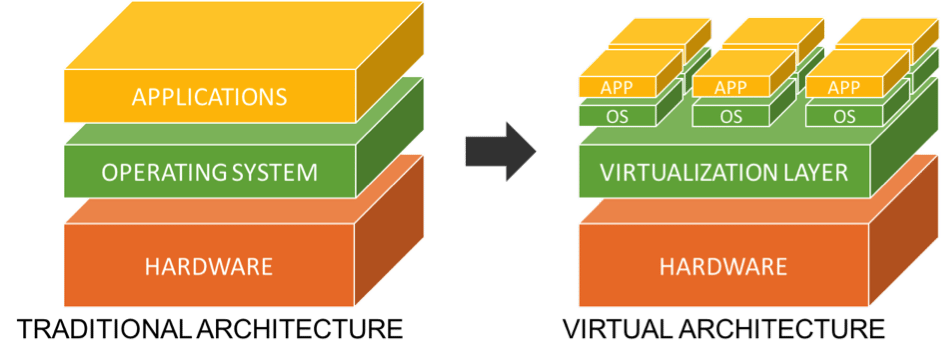
On a traditional architecture, also known as bare metal in the hosting industry; you run the operating system and then you run the application within the OS.
On a virtual architecture, you run a virtualisation layer (also called an Hypervisor) in which you run Virtual Private Servers. Finally within these VPS, you may run a different OS and then your applications.
Some of the most popular virtualisation technologies are:
- OpenVZ / Virtuozzo
- KVM
- VMware ESX
- Xen / Citrix
- OpenStack
- HyperV
- Proxmox VE
What is a RDP?
The Remote Desktop protocol is a Microsoft proprietary technology
think of it as the technology that lets you see and control a Windows computer from across the world. It transmits keyboard and mouse input over the network and streams the graphical display back to you.
When you connect via RDP, you’re literally seeing the desktop, taskbar, and applications as if you were sitting in front of the physical machine. It’s graphical, interactive, and designed for one-to-one connections.
RDP works best for:
- IT support teams providing remote assistance
- Desktop engineers managing servers graphically
- Remote workers accessing corporate machines
- Troubleshooting specific issues on a Windows Server
- Applications that require GUI interaction (legacy software, specialized tools)
RDP Limitations:
- Requires a live Windows machine to connect to
- Higher bandwidth usage than command-line protocols (SSH)
- Security risk if misconfigured (exposed port 3389 is a common attack vector)
- Not ideal for headless server deployments
- Slower over high-latency connections (satellite internet, international links)
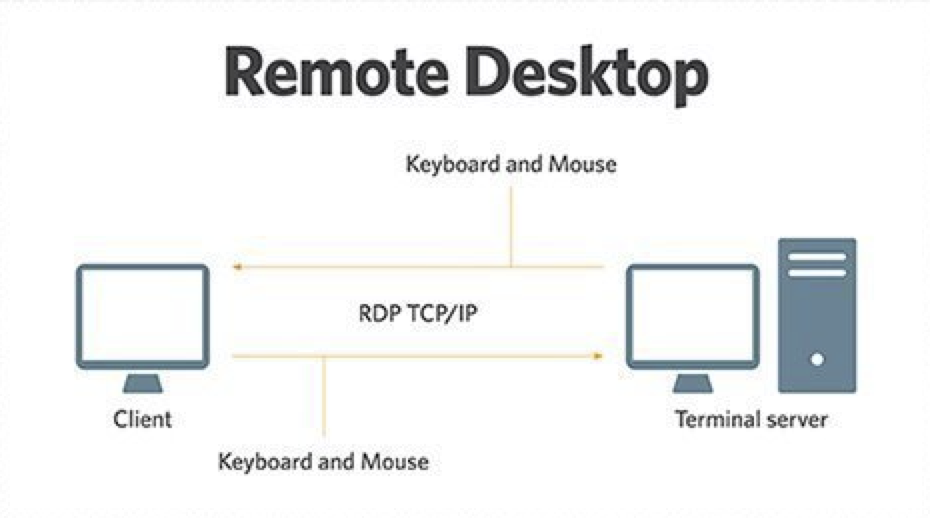
The RDP protocols operates through the 3389 TCP port.
Some others solutions provide a similar benefit such as:
- VNC Solutions
- LogMeIn
- TeamViewer
Can I use VPS as RDP?
Yes and No. A VPS can be used as a Remote Desktop. But the protocol is the technology enabling the administration and remote display of any type of Windows machine. Such remote access is generally indicated on a Windows server environment such as a dedicated server or a virtual private server.
Yet, the sole intent of a VPS isn’t to be used as RDP but it is to be accessed through RDP when running Windows as operating system. The VPS itself will serve different purposes such as:
- Hosting a website
- Hosting an application
- Hosting an mail exchange server
- Or being used as a Remote Desktop for an organisation or third party.
So Why The Confusion?
As we have seen both terms are widely different and yet, you have probably heard them both combined in the same sentence or even heard RDP being used as if it was a VPS.
The main reason is because of Windows VPS hosting solutions. These Virtual servers are accessed almost exclusively through the Remote Desktop protocol. Therefore, upon delivery of such services, the only access is through the RDP protocol. On specific industries, the RDP word has come to mean the same thing as a Windows VPS.
Can I use several RDP on a VPS?
As a server administrator, you’ll be able to create more than one users on your remote Windows operating system. When you are using a Windows VPS, you are the sole user of that virtualized remote server. Therefore, you’ll be able to configure multiple users which would come with their respective remote desktops. Each user will have its own set of applications through their own Windows session and logins. While you may add many users, there is a Windows license limits on how many simultaneous Remote Desktop Sessions you may use. You may refer to our Window Licensing Guide in order to obtain more information about the different allowance per Microsoft licenses. Please note that the allowances are independent on whether you are using a virtual server or not.
You may have come across or heard about a common use case which is to use multiple virtual servers in order to benefit from many Remote Desktop connections. There are indeed important considerations of doing so, compared to the creation of several user accounts with each a Remote Desktop connection are:
- Several Remote Desktop Accounts are sharing the same set of server resources which could be limiting in some cases.
- A shared environment may also introduce a set of privacy & security complexities. There is a risk of cross access to files from different user.
- Overcome the 2 simultaneous remote access licensing restriction (instead of increasing the CAL license)
Can I use RDP on a Linux VPS Server?
The Remote Desktop access is a Microsoft proprietary technology but it is possible to install the XRDP package on a linux distribution offering a Graphical Interface (Gnome or KDE).
Once installed, you may then use the Remote Desktop client on a Windows machine to access your Linux VPS.
In the server industry, this use case is marginally used as some others solutions are generally preferred such as:
- SSH for Command Administration (No Desktop)
- VNC for Desktop Administration (Full Desktop Visualisation)
- KVM Console provided by hosting providers (Both Terminal & Desktop are supported in this method)




I think windows is better for new users and linux is better for old users!
Hello Devid,
Indeed usability and expertise field are reasons why one would choose Windows over Linux. However, for some applications Windows introduce a resource usage overhead and is less what you do is what you get which would be required in some environment.
Besides .NET / ASP / MSSQL requirements or a RDP type of usage, Linux is the indicated route for the users and some managed solutions are existing as well for new users.
thanks for explaining the difference
Thanks for sharing the differences. Your website is very helpful.